![foleon_logo_white.png]](https://www.foleon.com/hs-fs/hubfs/foleon_logo_white.png?height=40&name=foleon_logo_white.png)
In this article
Activate AI for your account
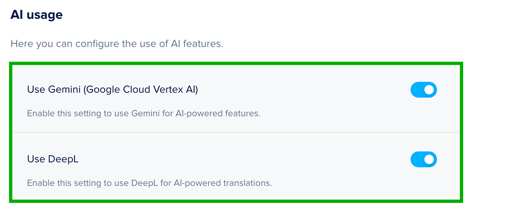
Before getting started with AI, your Admin needs to enable AI usage in the Admin Console. Our AI features use two different engines, and each must be enabled to unlock all features:
-
Gemini (Google Cloud Vertex AI) powers generation tools like image creation, in-editor text assistance, and Conversational AI. Access is turned off by default and must be enabled manually.
- DeepL powers AI translation tools to translate your Docs or pages. Access is turned on by default.
You can adjust these settings at any time in Global Account Settings.
Overview of AI capabilities in Foleon
Explore all of the available AI tools and how they can help you work more efficiently:
- Conversational AI (closed beta)
Turn your Doc into a chat experience. Readers ask a question and get an answer pulled from that Doc's own content, with a link back to the page it came from. You also see what readers are asking in your analytics.
➡️ Learn more about Conversational AI - Custom Code Element (beta)
Add an interactive widget you built in an AI tool, like a calculator, configurator, or quiz, straight into your Doc. It runs in its own iFrame, so it can't affect the rest of your page.
➡️ Learn more about the Custom Code Element - AEO-optimized format
We're improving how Foleon Docs render, so your content is faster to load and easier for AI tools and search engines to find, read, and cite. It all happens in the background, with nothing to rebuild on your end.
➡️ Learn more about AEO and GEO for Foleon Docs - AI Image Generator
Generate custom visuals using a text prompt, directly in the editor. Ideal for creating on-brand images without external tools or design software.
➡️ Learn more about generating images in Foleon - Improve your text with the AI Text Assistant
The AI Text Assistant brings AI-powered writing support directly into the editor. It helps you adjust the tone of voice, shorten or summarize content, and suggest alternatives.
➡️ Learn more about improving your text with the AI Text Assistant - Translate your Doc
Translate an entire Foleon Doc into another language in one click. Great for scaling your content across markets while keeping layout and formatting intact.
➡️ Learn more about translating your Doc - Translate your Page
Translate a single page or overlay directly in the editor. Perfect for quick updates or multilingual one-pagers.
➡️ Learn more about translating your pages - Foleon Grid (coming soon)
Foleon Grid is a new AI-native creation experience: one editor that takes you from a first idea to a published Doc. Start by prompting Draft to build a brief, outline, and wireframe, then generate your Doc and refine it in the Grid editor with the Co-create agent.
➡️ Read more about Foleon Grid
| Feature | Best for | AI engine used |
| Conversational AI | Answering reader questions inside a Doc | Gemini |
| Custom Code Element | Embedding widgets you built yourself | N/A, you build the widget in your own AI tool |
| AEO-optimized format | Being found and cited by AI tools and search engines | N/A |
| AI Image Generator | Creating visuals from prompts | Gemini |
| AI Text Assistant | Improving text directly in the editor | Gemini |
| Translate your Doc | Full Doc translation | DeepL |
| Translate your Page | Single page or overlay translation | DeepL |
| Foleon Grid (coming soon) | Creating and editing your Doc with a prompt | Gemini |
Tracking your AI credits
Your plan will determine how many AI credits you receive each month. Credits are consumed whenever someone uses an AI feature in Foleon.
- Credits refresh automatically each month
- If you reach your credit limit, contact your Customer Success Manager to add more
💡 While the AI credit system is in beta, all accounts receive 1,000 complementary credits per month to explore and test new capabilities. If you hit your AI credit limit during this time, contact your Customer Success manager.
Data protection for AI features
To provide you with our growing suite of AI-powered features, Foleon partners with specialist third-party AI service providers. Here’s what you need to know about how your data is handled:
AI Service Providers as Sub-processors
When you choose to enable our AI features, you agree that the specific AI provider for that feature will act as an approved sub-processor under your agreement with Foleon. If you do not enable the AI features, your data will not be shared with these sub-processors.
For full transparency, we maintain an up-to-date list of our AI sub-processors and the features they power. You can review this list at any time under the Foleon Data Processing Agreement.
💡Note: If your organization has a separately negotiated Data Processing Agreement with Foleon, the engagement of new AI sub-processors may be subject to the terms of that agreement. We recommend contacting your relevant department to confirm the approving of a new sub-processor before you toggle a new feature on.
What Data is Processed?
When you use an AI feature, the relevant content or input you provide is securely processed by the respective AI provider for the purpose of delivering you the AI feature. Your data is not used to train any AI models.
Our Commitment to Data Protection
We carefully select AI partners who provide strong contractual commitments regarding data security, confidentiality, and data handling. The processing of personal data in connection with AI features remains subject to Foleon Data Processing Agreement and applicable data protection laws, including GDPR.
You're in Control
You are in full control. You can enable or disable AI features at any time from your AI settings. Disabling the features will immediately stop any of your data from being shared with AI sub-processors.