![foleon_logo_white.png]](https://www.foleon.com/hs-fs/hubfs/foleon_logo_white.png?height=40&name=foleon_logo_white.png)
In this article
Default settings for AI usage
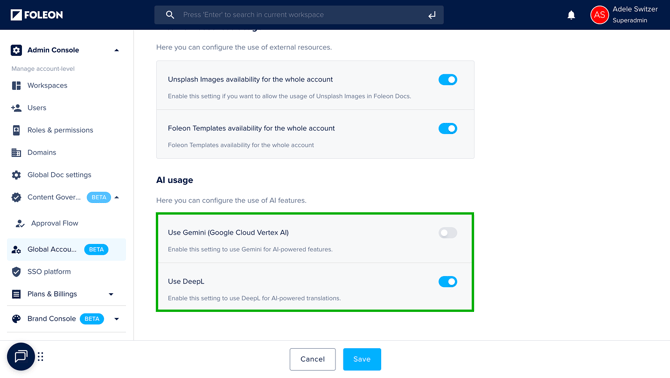
Foleon allows you to control which AI-powered tools are available to your users. Foleon’s AI capabilities are grouped under two settings:
- Use Gemini (Google Cloud Vertex AI): Enables tools like AI text assistance, image generation, and Conversational AI.
-
Use DeepL: Enables AI-powered translation tools
You can enable or disable these features at any time from the Admin Console.
⚠️ The following settings are enabled by default on your platform:
❌ The use of Gemini is turned OFF by default
✅ The use of DeepL is turned ON by default
The table below shows which features rely on each toggle:
| AI Feature | Uses Gemini | Uses DeepL |
| Translate your Page | ✅ | |
| Translate your Doc | ✅ | |
| AI Image generator | ✅ | |
| AI Text Assistant | ✅ | |
| Conversational AI | ✅ |
Enable or disable AI usage
To change your AI usage settings:
- Go to Admin Console > Global Account Settings
- Scroll to the AI Usage section
- Use the toggles to enable or disable DeepL and Gemini
- Click Save
⚠️ Before enabling the features, be sure to review the info below on data protection and how your data is handled.
If you enable the option to use Gemini (Google Cloud Vertex AI), you will be asked to confirm the following:
- By activating these features, you agree that Google Cloud Vertex AI will be engaged as an approved sub-processor under your agreement with Foleon*.
*If your organization has a custom agreement with Foleon, adding new sub-processors may require approval under that agreement. Please confirm internally before enabling these features. - You agree that your content and personal data will be processed only to deliver these features and will not be used to train AI models.
- You may turn off these AI features at any time by disabling this option.
- Click “Accept” to enable AI features.
Data protection for AI features
To provide you with our growing suite of AI-powered features, Foleon partners with specialist third-party AI service providers. Here’s what you need to know about how your data is handled:
AI Service Providers as Sub-processors
When you choose to enable our AI features, you agree that the specific AI provider for that feature will act as an approved sub-processor under your agreement with Foleon. If you do not enable the AI features, your data will not be shared with these sub-processors.
For full transparency, we maintain an up-to-date list of our AI sub-processors and the features they power. You can review this list at any time under the Foleon Data Processing Agreement.
💡Note: If your organization has a separately negotiated Data Processing Agreement with Foleon, the engagement of new AI sub-processors may be subject to the terms of that agreement. We recommend contacting your relevant department to confirm the approving of a new sub-processor before you toggle a new feature on.
What Data is Processed?
When you use an AI feature, the relevant content or input you provide is securely processed by the respective AI provider for the purpose of delivering you the AI feature. Your data is not used to train any AI models.
Our Commitment to Data Protection
We carefully select AI partners who provide strong contractual commitments regarding data security, confidentiality, and data handling. The processing of personal data in connection with AI features remains subject to Foleon Data Processing Agreement and applicable data protection laws, including GDPR.
You're in Control
You are in full control. You can enable or disable AI features at any time from your AI settings. Disabling the features will immediately stop any of your data from being shared with AI sub-processors.