![foleon_logo_white.png]](https://www.foleon.com/hs-fs/hubfs/foleon_logo_white.png?height=40&name=foleon_logo_white.png)
In this article
How AI credits work
Your account gets a monthly allowance of AI credits. Every time you use an AI feature, it draws credits from that allowance. All AI features share a single balance across your entire account.
Credits are used when you:
- Rewrite, retone, or shorten text with the AI Text Assistant
- Create images with the AI Image Generator
- Translate individual pages or an entire Doc
- Generate content with Foleon Grid (coming soon)
Your monthly allowance depends on your plan and is sized to cover the work most teams already do each month. You can see your exact allowance on the Credits page in the Admin Console.
📖 For more information on all our AI features, read our AI overview here.
Where to track your AI credit usage
Admins can check your account’s AI credit balance in the Admin Console:
- Open the Admin Console.
- Click Plans & Billing.
- Select Credits.
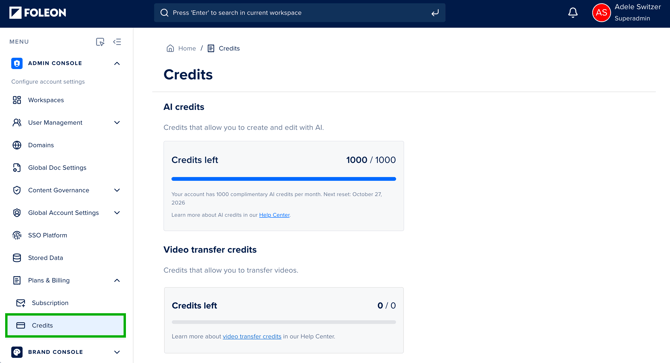
The Credits page shows:
- Your remaining credits
- Your monthly credit allocation
- Your next renewal date
When your credits renew
Your credits renew every month, on the same day your subscription started.
Example: If your subscription started on April 14, your credits renew on May 14, June 14, and so on.
If you run out of credits before your next renewal, contact your Customer Success Manager. We’ll help you with a one-off top-up or a recurring credit bundle.
⚠️ Unused credits expire at the end of each billing cycle. They don’t carry over to the next month.
How many credits an action uses
Each action uses a number of credits based on how much work the AI does. Quick actions, like editing text or generating an image, use the fewest credits. Generating a full document from several sources uses the most.
| Action | Examples | Approximate credit use |
| Edit existing content | Rewrite, retone, or shorten a section with the AI Text Assistant | About 30 credits |
| Generate an image | One image from the AI Image Generator | About 25 credits |
| Translate a page | One page translated into one language | About 40 credits |
| Translate a 10-page Doc | 10 pages translated into one language | About 400 credits |
| Generate a short piece with Grid (coming soon) | A newsletter, social post, landing page section, or product blurb | About 100 credits |
| Generate a full document with Grid (coming soon) | A report, whitepaper, brochure, or magazine built from several inputs | About 500 credits |