
Say hello to smarter content creation. With our suite of AI features, you can work faster, create more efficiently, and localize your content without starting from scratch.
From converting PDFs to generating custom visuals, our AI tools help you scale your content operations while keeping everything on brand. Whether you’re repurposing legacy assets or publishing in multiple languages, you’ll find new ways to create with confidence.
In this article
Activate AI for your account
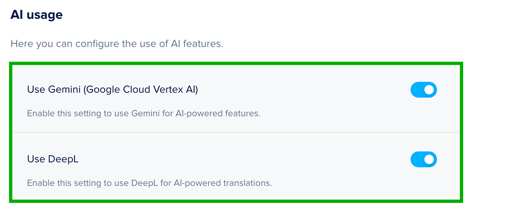
Before getting started with AI, your Admin needs to enable AI usage in the Admin Console. Our AI features use two different engines, and each must be enabled to unlock all features:
-
Gemini (Google Cloud Vertex AI) powers generation tools like image creation and PDF conversion. Access is turned off by default and must be enabled manually.
- DeepL powers AI translation tools to translate your Docs or pages. Access is turned on by default.
You can adjust these settings at any time in Global Account Settings.
Tracking your AI credits
Your plan will determine how many AI credits you receive each month. Credits are used when someone generates an image, translates a page, or converts a PDF.
- Credits refresh automatically each month
- If you reach your credit limit, contact your Customer Success Manager to add more
💡 While the AI credit system is in beta, all accounts receive 1,000 complementary credits per month to explore and test new capabilities. If you hit your AI credit limit during this time, contact your Customer Success manager.
Overview of AI features
Explore all of the available AI tools and how they can help you work more efficiently:
- AI PDF to Foleon Doc Converter (beta)
Convert static PDFs into editable, responsive Foleon Docs. This helps you quickly repurpose legacy files without rebuilding them from scratch.
➡️ Learn more about converting your PDFs to Foleon Docs. - AI Image Generator (beta)
Generate custom visuals using a text prompt, directly in the editor. Ideal for creating on-brand images without external tools or design software.
➡️ Learn more about generating images in Foleon. - Translate your Doc (beta)
Translate an entire Foleon Doc into another language in just one click. Great for scaling your content across markets while keeping layout and formatting intact.
➡️ Learn more about translating your Doc. - Translate your Page
Translate a single page or overlay directly in the editor. Perfect for quick updates or multilingual one-pagers.
➡️ Learn more about translating your pages.
| Feature | Best for | AI engine used |
| AI PDF to Foleon Doc Converter | Turning legacy PDFs into responsive Docs | Gemini |
| AI Image Generator | Creating visuals from prompts | Gemini |
| Translate your Doc | Full Doc translation | DeepL |
| Translate your Page | Single page or overlay translation | DeepL |