AI credits are used when you access AI-powered features in the platform, such as generating images or translating Docs or Pages. Each action consumes a specific number of credits depending on its complexity or size. In this article, we'll explain how the AI credit system works.
💡 While the AI credit system is in beta, all accounts receive 1,000 complementary credits per month to explore and test new capabilities. If you hit your AI credit limit during this time, contact your Customer Success Manager.
In this article
How AI credits work
Every time you use an AI-powered feature in Foleon, credits are consumed. The number of credits used depends on the complexity and size of the action. If you run out of credits, you can always add more when needed!
Credits are automatically renewed monthly, based on your billing cycle.
Example: If your subscription started on April 14, your credits will renew on May 14, June 14, and so on.
💡 More information on credit consumption will be shared soon!
📖 For more information on all our AI features, read our AI overview here.
⚠️ Please be aware that any unused credits will expire and will not carry over to the next billing cycle.
Where to track your AI credit usage
You can easily keep track of your AI credit usage:
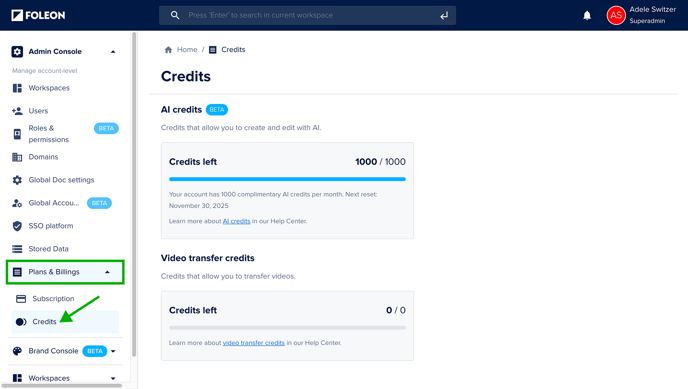
- Open the Admin Console
- Click Plans & Billing and select Credits
On the Credits page, you'll see:
-
Your remaining credits for the month
-
Your monthly credit allocation
-
Your next reset date