![foleon_logo_white.png]](https://www.foleon.com/hs-fs/hubfs/foleon_logo_white.png?height=40&name=foleon_logo_white.png)
In this article
⚠️ You can embed any public module or chart. The number of public modules and charts you can have depends on your plan. Contact us if you need access to more.
What you can embed
Your website is one of your most valuable touchpoints, but keeping it fresh and interactive often means working around CMS limitations or waiting on development resources.
Embeddable content lets you take the modules and charts you've already built in Foleon and place them directly into your existing web pages. Update them once in Foleon, and changes go live automatically, no republishing or rebuilding needed.
- Modules — reusable blocks of content built and managed in Foleon
- Charts — interactive data visualizations created in Data Visualizer
Both can already be reused across your Foleon Docs. Embeddable content extends that reach, bringing the same governed, up-to-date content onto your website without rebuilding anything in your CMS.
Embed a module
💡 Before you start: Your module must be published before you can generate an embed code. Learn how to create and publish a module.
- Open the Dashboard and go to Modules.
- Find the module you want to embed.
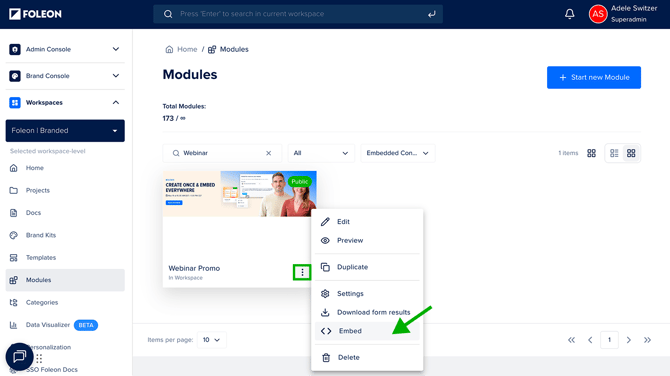
- Click the quick actions menu on the module.
- Select Embed.
- Select which Brand Kit should apply to the embedded module. This controls how it's styled on your website.
- Copy the embed code.
- Paste the embed code into your CMS or website platform.
The module appears on your page in an iframe. Any updates you make to the module in Foleon are reflected automatically. No need to re-embed.
Add an accessibility title to your embedded module
Give your embedded module a title so people using screen readers hear what the content is before they reach it. This helps your website meet accessibility standards (WCAG).
- Open the Dashboard and go to Modules.
- Click the quick actions menu (⋮) on the module.
- Select Settings.
- Enter a title in the Title (Accessibility) field.
- Click Save.
💡 If you leave the field empty, the module name is used instead.
Embed a chart
💡 Before you start: Your chart must be set to public before you can generate an embed code. Draft charts cannot be embedded. Learn how to create and publish a chart.
- Open Data Visualizer from the dashboard.
- Find the chart you want to embed.
- Click the quick actions menu (⋮) on the chart.
- Select Embed.
- Copy the generated embed code.
- Paste the embed code into your CMS or website platform.
The chart appears on your page in an iframe and stays fully interactive. Any updates made to your chart in Foleon's Data Visualizer are reflected automatically wherever the chart is embedded.
.png?width=670&height=386&name=Quick%20actions%20menu%20-%20embed%20(1).png)
What to use it for
Embeddable content works across a range of scenarios. Here are some of the most common ways teams use it.
Campaign and event content: Promote an event, speaker lineup, or limited-time offer without making permanent changes to your CMS. When the campaign ends, update or remove the module in Foleon and every page reflects it straight away.
Interactive data storytelling: Replace static chart screenshots with interactive, branded charts. Benchmark data, campaign results, or industry insights stay accurate because when you update the data in Data Visualizer, every embedded instance updates with it.
Centralized content updates: Embed content that needs to stay current across multiple pages: G2 badges, webinar overviews, award banners, team sections, or company overviews. Update the source in Foleon once and every page that uses it reflects the change automatically.
Frequently Asked Questions
Does embeddable content affect my SEO?
Content embedded via iframe is indexed as part of its source in Foleon, not as part of the page it sits on. This means embedded modules won't directly contribute to your page's SEO. Using the reverse proxy setup helps get SEO benefit from full Foleon docs.
📖 Learn more: Integrating Foleon Docs into your SEO strategy
Can I embed an entire Foleon Doc?
Yes. Embedding a full Doc has always been possible in Foleon. Embeddable content takes this further by letting you embed individual modules and charts, so your content becomes part of your existing page rather than a separate experience within it.
📖 Learn more: Embed your Foleon Doc on a website
Does it work with any CMS?
Yes. The embed code works independently of your CMS. As long as you can add a small snippet of code to a page, you can embed Foleon content on it, whether you're using WordPress, Webflow, HubSpot, or any other platform. No integration between Foleon and your CMS is required.
How does the iframe behave on mobile?
The iframe automatically shrinks to fit mobile screens. A built-in script also resizes the iframe height to prevent double scrollbars from appearing on the page.
Can I embed Data Visualizer charts as well as modules?
Yes. Charts created in Data Visualizer can be embedded on your website in the same way as modules. Your data stays interactive, on-brand, and always up to date wherever it appears.
Which plans include embeddable content?
Embeddable content is available to all customers with Global Content Modules and/or Data Visualizer. You can embed any live module or chart, but your plan's limit on the number of live modules and charts applies. If you want to embed more, contact us here.
📖 Learn more: Global Content Modules
📖 Learn more: Create a chart with Data Visualizer