![foleon_logo_white.png]](https://www.foleon.com/hs-fs/hubfs/foleon_logo_white.png?height=40&name=foleon_logo_white.png)
Understanding video transfer credits
With Foleon Video, you can upload your own video files directly into the platform and add them to your Foleon Docs without relying on third-party platforms.
When you enable Foleon Video, you’ll choose from a range of add-on subscription options, each offering a specific amount of monthly bandwidth (measured in terabytes). As viewers stream your videos, credits are consumed based on the playback minutes.
Credits are automatically renewed monthly, based on your billing cycle.
Example: If your subscription started on April 14, your credits will renew on May 14, June 14, and so on.
Note: If you're using a Foleon Video trial, you have a fixed number of video hosting credits available for the duration of your trial. These credits do not renew monthly.
⚠️ Foleon Video is available as an add-on. If you'd like access to this feature, contact us here.
💡Currently, if you reach your credit limit, your videos will continue playing to avoid any downtime. Our team will be in touch to discuss the next steps.
Where to track your video transfer credit usage
You can easily keep track of your video transfer credit usage:
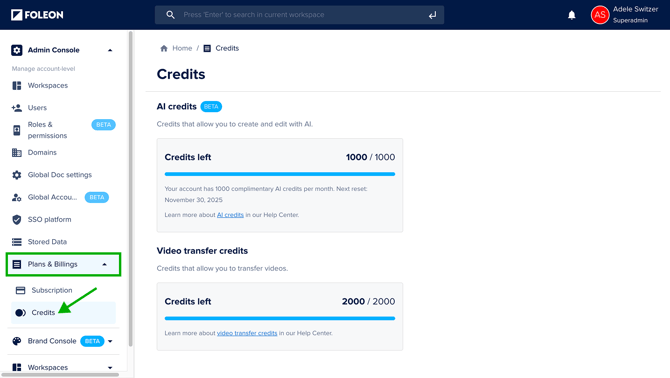
- Open the Admin Console
- Click Plans & Billing and select Credits
Here, you’ll see:
- Your remaining video transfer credits
- Your credit allocation