![foleon_logo_white.png]](https://www.foleon.com/hs-fs/hubfs/foleon_logo_white.png?height=40&name=foleon_logo_white.png)
In this article
💡 Don't have a Brand Kit set up yet? Learn how to create one in: Govern your brand with a Brand Kit
Apply a Brand Kit to a Foleon Doc
When you create a new Foleon Doc, the default Brand Kit for your workspace is applied automatically. If you want to apply a different Brand Kit, or apply one to an existing Doc, follow these steps:
-
Open the Foleon Doc in the editor.
-
Go to Menu > Brand. The brand settings panel will open on the right side of your screen.
-
Click the Select button 🎨 and choose your Brand Kit from the dropdown menu.
-
Click Apply Brand Kit to set your styling.
⚠️ If you apply a new Brand Kit, you'll override the current brand styling and change how your Doc looks. You can't undo this.
Elements that have been styled manually on your page (and therefore are no longer linked to the Brand Kit) won't change when you apply a new Brand Kit.
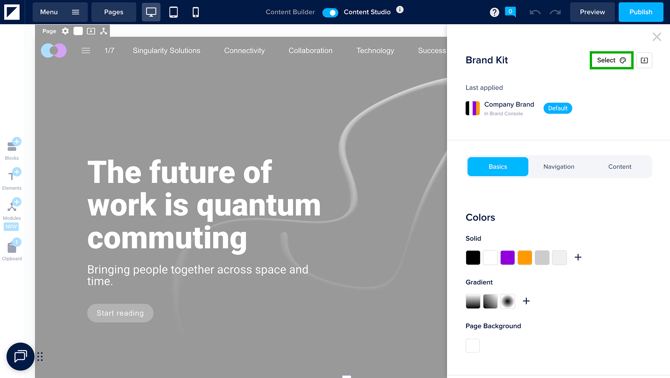
If the Apply Brand Kit button is greyed out, it can mean one of the following:
- A Brand Kit has yet to be created in the dashboard,
- the Brand Kit has already been applied, or
- the current brand settings already match the Brand Kit.
After applying your Brand Kit, you'll see a section called Last applied. This shows you which Brand Kit was most recently used, helping you track which brand is active in your Doc.
Did you apply a Brand Kit to a Doc before October 27, 2025? If so, the Last Brand Kit applied section won’t appear as this feature wasn’t available yet. To view this section, simply reapply your Brand Kit.
Reapply a Brand Kit
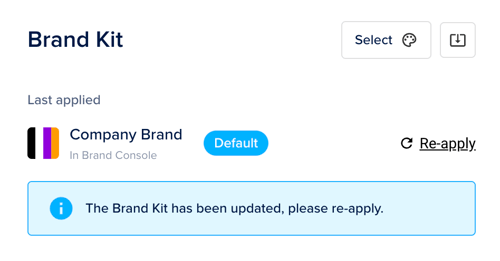
If a Brand Kit has been updated, those changes won't automatically apply to Docs that already use it. Reapplying the Brand Kit updates your Doc with the latest styling.
-
Open the Foleon Doc in the editor.
-
Go to Menu > Brand. The brand settings panel will open on the right side of your screen.
-
Click the Re-apply button,
-
Click Apply to confirm.
⚠️ Reapplying a Brand Kit will override any manual styling changes made to elements that are still linked to the Brand Kit.
Changing or removing a Brand Kit from a Doc
Once you've applied a Brand Kit to a Doc, you can't necessarily remove it to return the Doc to an unbranded state. Instead, there are two options:
-
Apply a different Brand Kit: If you have another Brand Kit you'd rather use, apply it using the steps above. The Doc's styling switches to match the new Brand Kit.
-
Manually edit the brand settings: Open Menu > Brand Settings for the Doc and adjust the styling directly. This disconnects the Doc from the applied Brand Kit, so you can continue editing that Doc's styling independently.
If you delete the Brand Kit itself, any Doc that used it will retain its styling, but will no longer have a Brand Kit applied.