
With Doc Translation, you can instantly convert your Foleon Docs into multiple languages, making it easier to reach international audiences without extra production effort. This feature delivers one-click AI translations tailored to your chosen tone—helping teams localize content quickly and efficiently while preserving brand consistency.
In this article
How to translate your Doc
Step 1: Enable AI availability
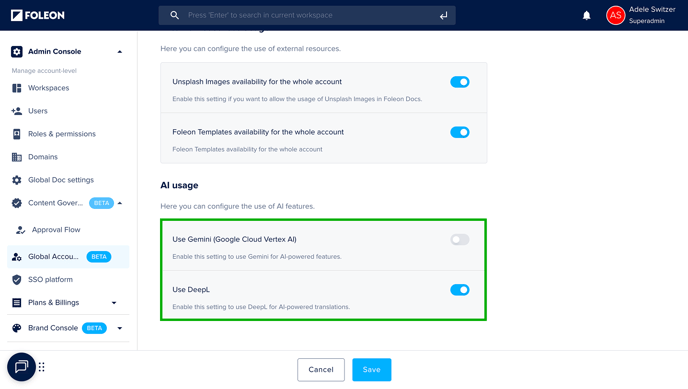
To use the AI Image Generator, the AI setting allowing the use of DeepL must be enabled for your account.
⚠️ Access to the AI-powered features using DeepL is turned ON by default. Only Admins can enable this option in the Admin Console.
📖 For more information, read our article: Active AI for your Account
Step 2: Duplicate & Translate
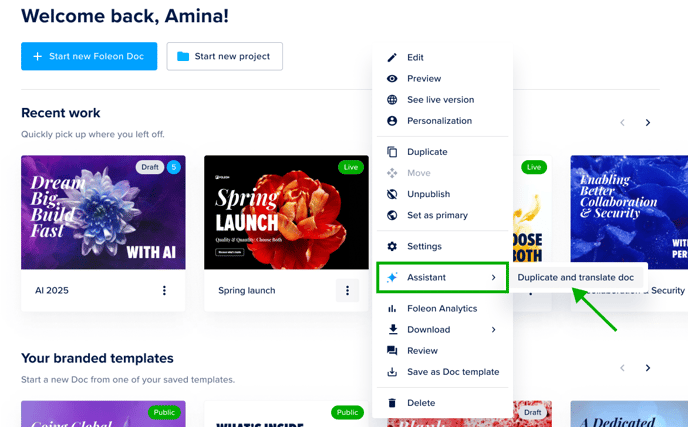
Click the quick actions menu (⋮) on the Doc you want to translate.
Select Assistant, and then choose Duplicate and Translate.
Choose the language. For some languages, you can also select the desired formality. Finally, select the project where you want to save the translated version.
Click Generate. The system will duplicate and translate the Doc. This may take a few minutes, depending on the size of your Doc.
That's it! Your Doc is now translated.
⚠️ Modules and cookie consent are not currently included in the translation. Be sure to update these manually.
Supported languages
We support translation into the following languages:
|
Arabic Bulgarian Chinese (simplified) Czech Danish Dutch English (American) English (British) Estonian Finnish French |
German Greek Hungarian Indonesian Italian Japanese Korean Latvian Lithuanian Norwegian (Bokmål) Polish |
Portuguese (all varieties excluding Brazilian Portuguese) Portuguese (Brazilian) Romanian Russian Slovak Slovenian Spanish Swedish Turkish Ukrainian |