![foleon_logo_white.png]](https://www.foleon.com/hs-fs/hubfs/foleon_logo_white.png?height=40&name=foleon_logo_white.png)
What is the Customer Portal?
The Customer Portal is a central location where Foleon users can:
-
Submit a new support request
-
Track the status of open tickets in real time
-
View ticket history and past conversations
-
Access the Knowledge Base for self-service help
It’s designed to streamline communication and make it easier to get support when you need it.
Why we built it
We noticed that conversations started via live chat sometimes went unanswered or unnoticed—especially when responses arrived after the chat ended.
To fix this, we previously sent transcripts via email, but those could easily get lost or ignored.
The Customer Portal solves this by giving users a dedicated space to follow up on their support tickets and see updates as they happen.
Key benefits
-
Full transparency: Users can see all their open and closed tickets at a glance.
-
Improved experience: Less room for miscommunication and missed messages.
-
Lower support load: Self-service access reduces the need to re-contact support for updates.
How to access the portal
Open the Customer Portal and log in with your Customer Portal account.
Create your account
When you submit a support request, you’ll receive a confirmation email with a link to the Customer Portal. Use this link to create your account the first time you access the portal.
If you haven’t received the email or want to set up your account, register directly from the portal:
- Open the Customer Portal.
- Click Register here at the bottom of the login page.
- Enter your email address.
- Enter a password.
- Click Register.
Still have questions? Reach out to our team.
How to view your organization’s tickets
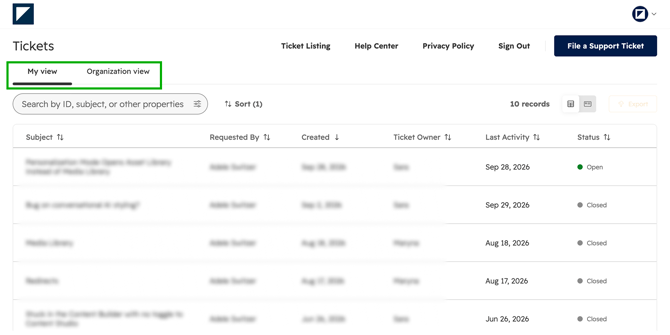
The Customer Portal has two views:
-
My view shows all the tickets you’ve submitted.
-
Organization view shows all tickets submitted by your organization, so you get a full overview of what’s happening across your team.