![foleon_logo_white.png]](https://www.foleon.com/hs-fs/hubfs/foleon_logo_white.png?height=40&name=foleon_logo_white.png)
💡 Foleon Docs are optimized for search engines but, by default, will not show in search results or be visible to AI crawlers.
Foleon Docs and search engine visibility
Foleon Docs are optimized for search engines but are not crawled and indexed by default. This means that your content won't be publicly available in search engines or to AI-powered tools unless you want it to be.
In the Foleon Doc Settings, in the Global Doc Settings tab, you will see the Search engine visibility toggle.
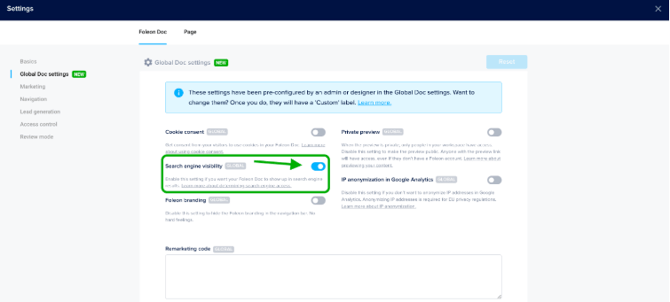
By default, this toggle is off (greyed out). With this setup, we block search engine crawlers from crawling its content and thus prevent the entire Foleon Doc from showing up on search engine result pages.
When search engine visibility is disabled, Foleon explicitly instructs search engines and crawlers to ignore the Foleon Doc by adding three meta tags to the head of the Doc’s source code:
-
<meta name="robots" content="noindex, nofollow" />
-
<meta name="robots" content="noindex" />
-
<meta name="robots" content="nofollow" />
This method aligns with the industry standard of hiding a web page from the rest of the web. For more technical information, we recommend reading Google's documentation on this topic.
Do you want your content to show in search engines and be visible to AI tools? You can click the toggle on the right side, making it blue. This means that if you publish your Foleon Doc with this setting enabled, your content will be indexed by search engines (e.g. Google) and may also be discovered and used by AI-powered tools.
Preventing individual pages from showing up
It's also possible to prevent specific pages of your Foleon Doc from appearing in the search engine results or being visible to AI crawlers. This might be useful when you want your Foleon Doc to be indexed by search engines, and thus publicly available, but certain pages are irrelevant.
In Settings > Page Settings, in the "SEO (Search Engine Optimization)" tab, you will see the Search engine visibility toggle.
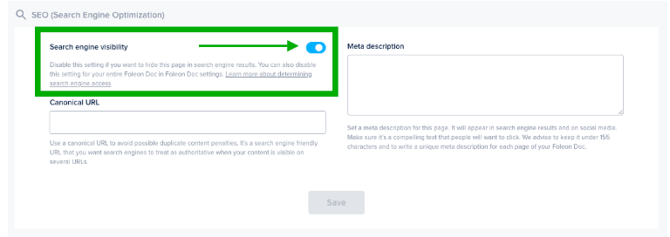
By default, this toggle is on (blue). However, because the search engine visibility option in the Foleon Doc settings overrides this, we won't index your page.
⚠️ Doc settings take precedence over Page settings. So, if you turn off Search engine visibility on your Doc, your pages will not be indexed, regardless of their settings.
In the table below, we've summarized the different results with the search engine visibility (SEV) option in both the Doc settings and page settings:
| Foleon Doc settings | Page settings | Result |
| SEV enabled | SEV enabled | Your Doc will be indexed and visible to AI crawlers |
| SEV enabled | SEV disabled | Your Doc will be indexed, but that specific page is excluded from search results and AI crawlers |
| SEV disabled (default) | SEV enabled (default) | Your Doc and pages won't be indexed or visible to AI crawlers |
| SEV disabled | SEV disabled | Your Doc won't be indexed or visible to AI crawlers |
Removing your Foleon content from Google’s search engine result pages
If you’ve accidentally published a private Foleon Doc with the "Search engine visibility" toggle on, you can prevent further issues by opening the Foleon Doc and navigating to Foleon Doc settings Marketing, switching off the toggle, and republishing your content.
However, search engines (like Google) will probably already have indexed your Foleon Doc which means it can still show up on search engine result pages. Only once your Foleon Doc is indexed again, search engines will see that it’s not supposed to be indexed and will remove it from its results. However, it can take a while before search engines refresh their indexing of your Foleon Doc.
You can speed this up by forcing Google to reindex the URL of your Foleon Doc. Google provides detailed documentation on how you can do this exactly. First, you will have to verify your site ownership, after which you can try to remove the property. Following the steps in these articles will help you to request the URL removal in Google.
⚠️ It can still take several weeks for your Foleon Doc's URL to drop in the search results. This is due to a worldwide synchronization beyond your (and our) control.
In some cases, you might even need to set the Foleon Doc offline while the request is pending, so that Google thinks that the website does not exist, and you’ll need to republish the Foleon Doc after the removal request has been processed.
Read more about setting a Foleon Doc offline in our article About the Quick Actions menu.
How to ensure your Doc is visible on Google
By default, the search engine visibility toggle is switched off. This means we hide your Doc from search engine and AI crawlers, preventing the entire Foleon Doc from appearing on search engine result pages.
If you've decided to toggle on search engine visibility and make your content public, you might want to check if your content has been indexed yet. To do so, follow the steps below:
- Double-check that you toggled on search engine visibility
If you haven't already, make sure to republish your content. It will take some time before your Doc shows in search results. It should be automatically indexed by Google, but to speed up the process, you can request indexing manually. Follow the next steps. - Double-check search results for your URL
In your Google address bar, type "site:" and the full URL of your Foleon Doc, e.g., "site:ebook.example.com". If you get 0 search results, this means that Google hasn’t indexed your domain yet.
- Follow the steps in the Google Search Console
Go to the Google Search Console and follow the steps as described by Google in the domain property type. This is where you verify your site ownership. Ownership verification means proving to Search Console that you own a specific website.
Verification allows you to see how Google is crawling and indexing your Foleon Doc so you can identify and fix any issues that may be affecting your visibility in search results.
⚠️ If you're hosting Docs on a Foleon domain, please contact support@foleon.com. Because we own the domain, we can start the verification process for you.
Does this setting also affect AI and LLM crawlers?
Yes. The Search engine visibility toggle controls more than just traditional search engines. It also determines whether AI-powered crawlers can find your Foleon Doc.
Why is this the case?
Foleon uses industry-standard noindex and nofollow meta tags to control visibility to AI crawlers. Most major AI crawlers, including those used by Google (Gemini, AI Overviews), OpenAI (ChatGPT), Anthropic (Claude), and Perplexity, respect these same meta tags.
⚠️ Turning off Search engine visibility prevents AI crawlers from discovering your Doc, but like any webpage, it can still be read by an AI tool if someone shares the URL directly (for example, by pasting it into a chat with ChatGPT or Claude). The AI reads the content in that session only. It does not store or index it, so other users cannot search for and find it later.
This means:
- Search engine visibility OFF (default): Your Doc is hidden from both traditional search engines and AI crawlers. AI tools will not discover, index, or use your content.
- Search engine visibility ON: Your Doc is visible to both. In addition to appearing in Google search results, it may also be discovered and used by AI systems — for example, appearing in AI-generated answers.
What this means for your content strategy:
If your Foleon Doc contains content you want to keep private — such as gated assets, internal documents, or client-specific materials — make sure the Search engine visibility toggle remains off. This will protect it from both search engines and AI tools.
If you want your Doc to be publicly discoverable, keep in mind that enabling this setting makes your content available to the broader web, including AI-powered tools, not just Google.