![foleon_logo_white.png]](https://www.foleon.com/hs-fs/hubfs/foleon_logo_white.png?height=40&name=foleon_logo_white.png)
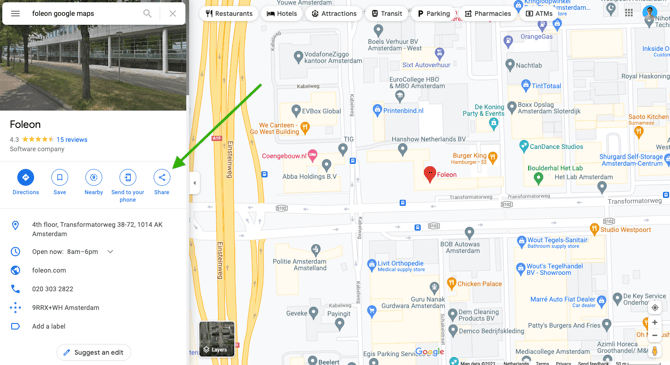
In Google Maps, open up the location you want to embed. Click on the Share icon.
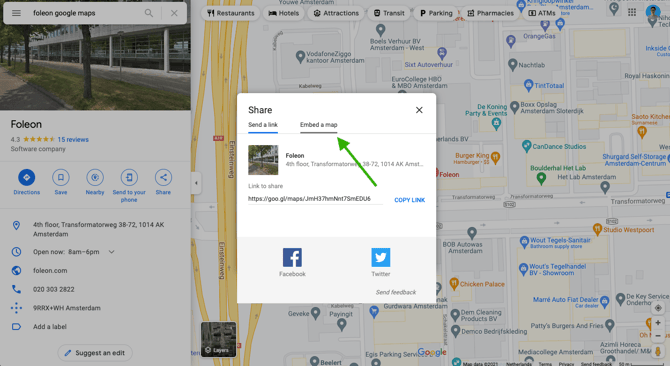
In the pop-up that appears, click on Embed a map.
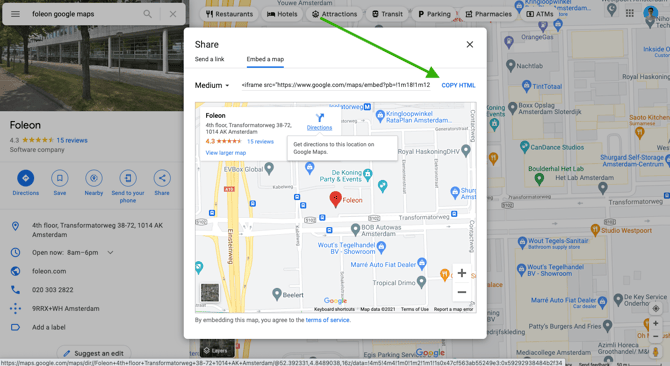
Next, click on Copy HTML to copy the embed code to your clipboard.
Paste this code in your notes to temporarily store it. The complete code will look something like this:
<iframe src="https://www.google.com/maps/embed?pb=!1m18!1m12!1m3!1d2434.7914422259532!2d4.846715115802702!3d52.392330979790174!2m3!1f0!2f0!3f0!3m2!1i1024!2i768!4f13.1!3m3!1m2!1s0x47cf563ab55249e3%3A0x59292938484b2f34!2sFoleon!5e0!3m2!1sen!2snl!4v1632382921275!5m2!1sen!2snl" width="600" height="450" style="border:0;" allowfullscreen="" loading="lazy"></iframe>From this code, you need to extract the source URL between the " ". From the example above, we have copied the following URL:
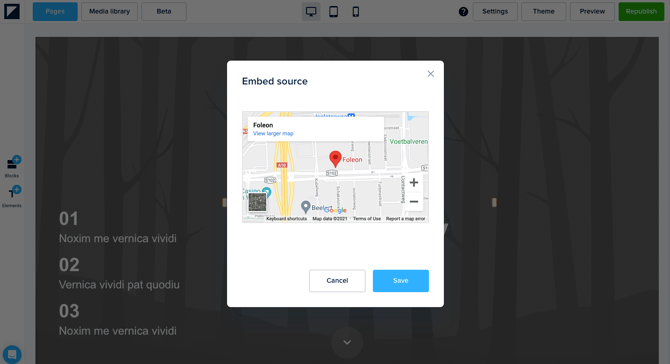
https://www.google.com/maps/embed?pb=!1m18!1m12!1m3!1d2434.7914422259532!2d4.846715115802702!3d52.392330979790174!2m3!1f0!2f0!3f0!3m2!1i1024!2i768!4f13.1!3m3!1m2!1s0x47cf563ab55249e3%3A0x59292938484b2f34!2sFoleon!5e0!3m2!1sen!2snl!4v1632382921275!5m2!1sen!2snlCopy this URL and go to your Foleon Doc. Add a URL embed element to your column and paste this URL in the URL field. If the URL is correct, a preview of the Facebook embed will be visible. Click on Save to add it to your page.
💡 Learn how to style your embed with the element settings in our article All about the URL Embed element.
Related articles