![foleon_logo_white.png]](https://www.foleon.com/hs-fs/hubfs/foleon_logo_white.png?height=40&name=foleon_logo_white.png)
💡 Want to learn more? Check out our article All about the URL Embed element.
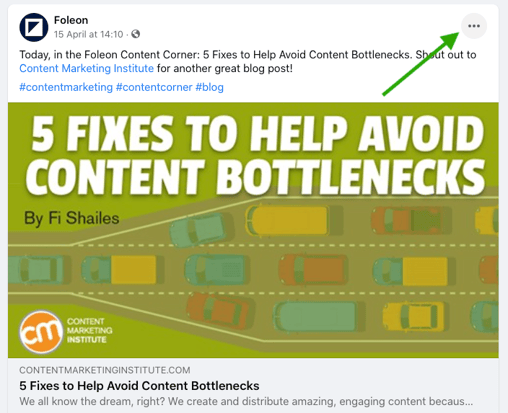
To embed a Facebook post, open the post on Facebook. Click on the three dots in the top-right corner of the post:
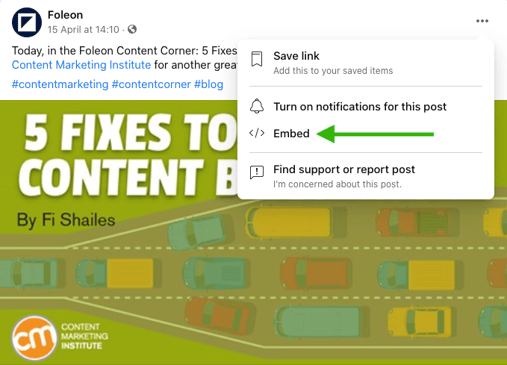
In the pop-up window that appears, click on Embed.
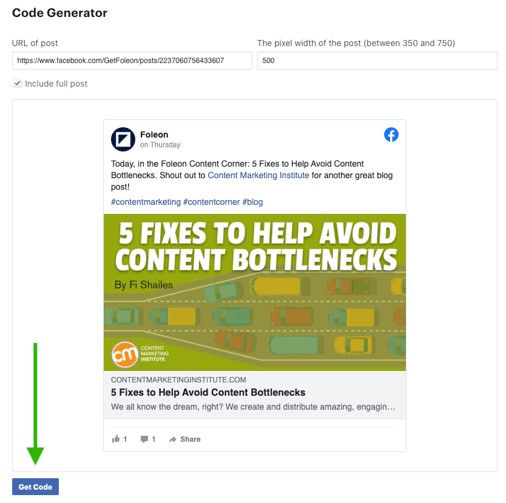
On the Embedded Posts page from Facebook, click on "Get code".
In the Get code pop-up, go to the iFrame tab on the top, then select and copy the Facebook link between " " (as illustrated below).
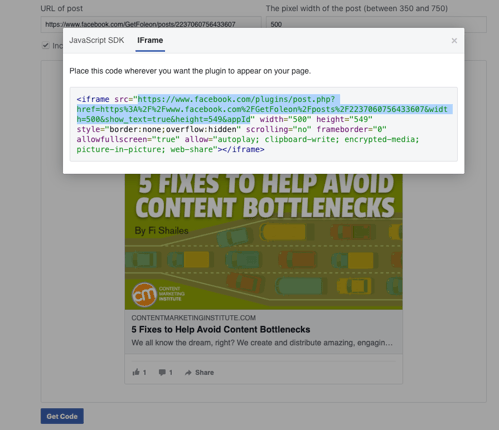
Copy this URL and go to your Foleon Doc. Add a URL embed element to your column and paste this URL in the URL field. If the URL is correct, a preview of the Facebook embed will be visible. Click on Save to add it to your page.
💡 Learn how to style your embed with the element settings in our article All about the URL Embed element.