![foleon_logo_white.png]](https://www.foleon.com/hs-fs/hubfs/foleon_logo_white.png?height=40&name=foleon_logo_white.png)
How to restore a deleted Doc
When you delete a Doc, it's not permanently removed right away. Instead, it's moved to a Deleted status for 90 days. During this time, you can restore it directly from your Docs page.
Any user with access to the workspace where the Doc was deleted can restore it.
⚠️ After 90 days, deleted Docs are permanently removed and cannot be recovered. Deleted pages cannot be recovered
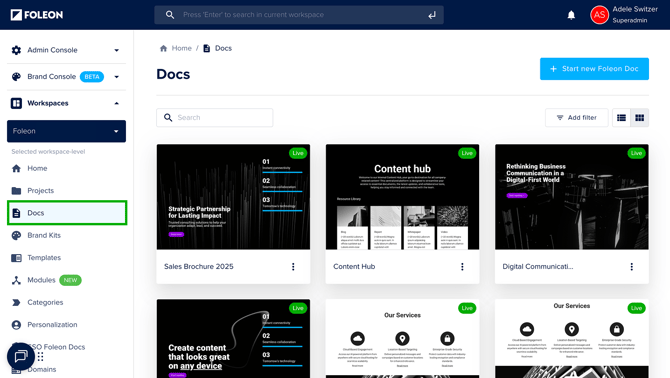
Step 1: Go to your Docs page
Open your dashboard and navigate to the Docs tab under the workspace where your Doc was deleted.
Step 2: Filter by deleted Docs
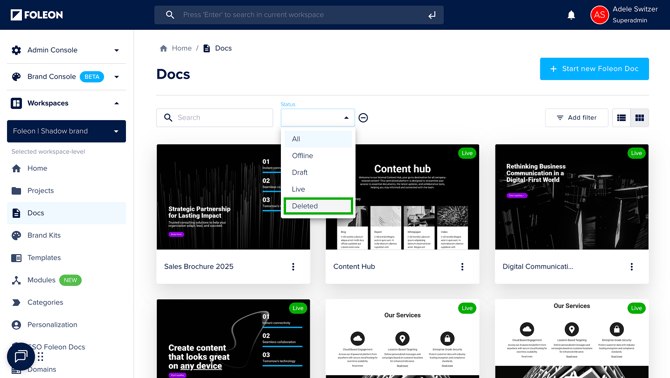
Click Add Filter and choose Status. Set the filter to Deleted.
You’ll now see a list of all Docs that have been deleted in the last 90 days.
Step 3: Restore your Doc
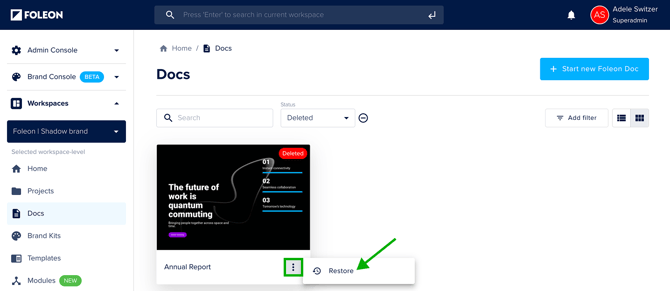
Click the Quick Actions menu (⋮) on the Doc you want to restore and select Restore.
The Doc will instantly return to its original project in your workspace.
💡 Restored Docs will appear in Draft status. Make sure to review your content before republishing!
Re-using a Doc Alias
⚠️ When you delete a Doc, its alias is still tied to that Doc. This means you cannot use the same alias for another Doc, even if the original Doc is deleted.
If you want to reuse the alias, you’ll need to:
-
Restore the deleted Doc
-
Change its alias
-
Delete the Doc again
After changing the alias, the original alias becomes available for another Doc.