![foleon_logo_white.png]](https://www.foleon.com/hs-fs/hubfs/foleon_logo_white.png?height=40&name=foleon_logo_white.png)
In this article
What is Dark Mode?
Dark Mode adjusts your Foleon dashboard to a darker theme, reducing eye strain in low-light environments and offering a sleek, modern look. You can toggle between Light and Dark Modes at any time, depending on your personal preference.
💡 The setting is user-specific and doesn't impact other users.

How to switch between Light and Dark Mode
To enable or disable Dark Mode, follow these steps:
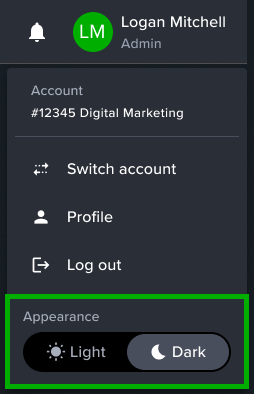
- In the top right corner of your Foleon dashboard, click on your profile icon
- Select Light or Dark from the toggle to switch between the two modes
⚠️ Dark mode is only available for the dashboard. The editor is not yet supported.